AI-NATIVE REMOTE DEBUGGING
It can't see the running app — it only knows what you retype from a screenshot. AppTelepath turns the live session into its context: see it, tap it, verify it on the spot.
Free beta is open · no credit card
telepath_screenshot ✓ 328 ms · LoginViewControllertelepath_view_hierarchy ✓ 27 interactive elements · ref n1 – n27telepath_tap ref=n12 # the “Sign in” button ✓ screen moved Login → Home · 0 error logstelepath_diagnose ✓ no crashes, no hangs, 0 failed requests · verified
As soon as a device connects, the app's runtime shows up here — and what you see is exactly what the agent gets.
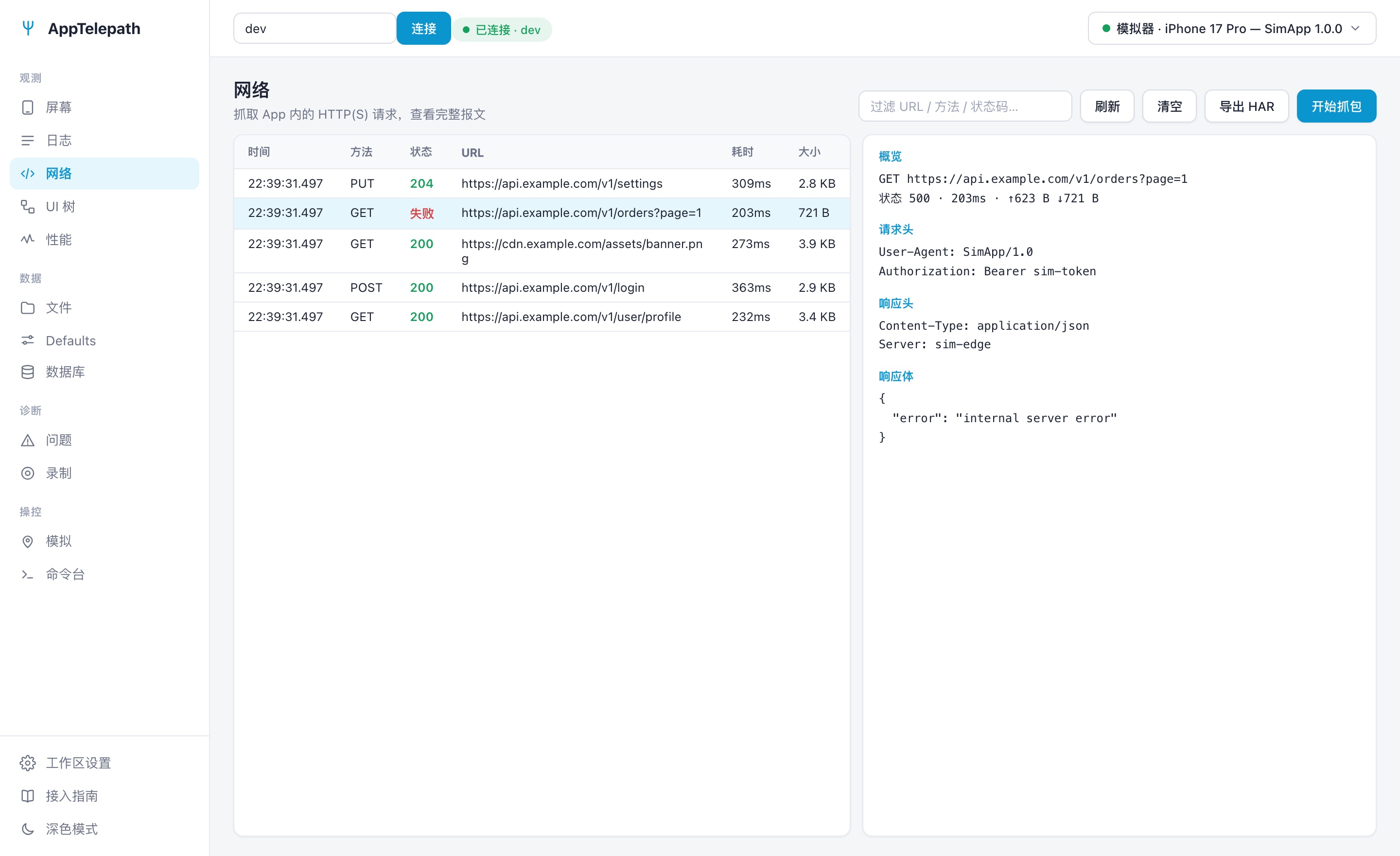
Screen · Logs · Network · UI tree · Performance · Files · UserDefaults · Database · Issues · Recording · Simulation · Command console
Every command returns structured data instead of a screenshot someone still has to interpret. Pick a command to see what the agent gets at each step.
▸telepath_screenshot
▸telepath_view_hierarchy mode=summary
{
"mode": "summary",
"snapshot": "s4",
"currentVC": "LoginViewController",
"interactive": [
{ "ref": "s4n5", "kind": "textfield", "accessibilityId": "email" },
{ "ref": "s4n6", "kind": "textfield", "accessibilityId": "password" },
{ "ref": "s4n7", "kind": "button", "text": "Sign in" }
],
"text": [
{ "ref": "s4n2", "text": "Welcome back" },
{ "ref": "s4n3", "text": "Sign in to continue" }
]
}
▸telepath_tap ref=s4n7
{
"ok": true,
"target": "UIButton(Sign in)",
"changed": {
"screenChanged": true,
"vcFrom": "LoginViewController",
"vcTo": "HomeViewController",
"appeared": ["text|Home", "button|Sign out"],
"disappeared": ["button|Sign in", "textfield|email"]
},
"incidents": { "errorLogs": 3, "failedRequests": 1 }
}
▸telepath_network_requests
{
"records": [
{ "id": 41, "method": "POST", "url": "/v2/login",
"status": 200, "durationMs": 182 },
{ "id": 42, "method": "GET", "url": "/v2/profile",
"status": 500, "durationMs": 96, "failed": true },
{ "id": 43, "method": "GET", "url": "/v2/feed?page=1",
"status": 200, "durationMs": 231 }
]
}
▸telepath_diagnose
{
"severity": "error",
"headline": "1 class of failing request: GET /v2/profile returned 500 (3× within 60s)",
"failedRequests": [
{ "method": "GET", "url": "/v2/profile",
"status": 500, "count": 3 }
],
"errorClusters": [
{ "count": 3, "sample": "ProfileService decode error: key 'avatar_url' not found" }
],
"crashes": [],
"hangs": []
}
Claude Code, Cursor, a shell script, CI, or just your own browser — the same live truth, reachable from anywhere. Anything the agent can do, you can do; anything you can see, it can see.
Connect the hosted endpoint and sign in to authorize it — your agent immediately gets everything it needs to see, tap and verify the app.
https://apptelepath.com/mcp
No MCP, no problem: scripts, CI, anything that can send a curl can invoke commands and subscribe to live events.
# tap “Sign in” on the screen curl -X POST $API/invoke \ -d '{"command":"ui.tap","ref":"n12"}'
Your team sees everything the agent sees — screen, logs, network, database, performance and session replay.
Seeing isn't enough. To fix a bug, an agent has to drive the interface, create the conditions, and verify the result then and there.
The agent taps and types on its own, hitting exactly the element it means to — so it verifies its own fix instead of waiting on you.
Poor network, location, push notifications — simulated in one call. The bug that “only happens in that one situation” reproduces in seconds.
Requests, logs, database, performance, crashes — whatever just happened inside the app, answered on demand.
Reproduce it once, and the whole team plus every agent can replay it. Bugs stop travelling as vague descriptions.
Same question, fewer tokens, fewer round trips — the agent gets there faster, and cheaper.
Register the debugging tricks unique to your app once, and every agent knows them from then on.
AppTelepath isn't one more session viewer. It opens up the debugging capability itself as a platform that agents and people share.
| Classic remote debugging | AppTelepath | |
|---|---|---|
| Primary interface | Built for people; the API is an afterthought | Built for agents and people alike, with identical capabilities |
| What it can do | Look back at what already happened | Observe — and also drive the app and create conditions |
| Cross-platform | iOS and Android registered as two separate apps | One workspace holds every device |
| Seats | Counted per person | Also per person — agents and devices take no seat |
| Getting started | Sign up → create a project → integrate → launch → go back to the site to look | Authorize the agent → it integrates → it verifies, with workspace and device credentials provisioned for you |
After a trusted agent client's first OAuth authorization, SDK setup, the device-only credential and the first verification are all handled by the agent.
Connect the hosted remote MCP and confirm the one trust boundary that matters: your account and workspace.
The agent installs the SDK, issues a device-only credential, and writes local build settings that only take effect in trusted test configurations.
The agent launches the app, confirms the device is online, and starts taking screenshots, diagnosing and reproducing.
// AppDelegate.swift · authorized test build #if TELEPATH_ENABLED import Telepath Telepath.start() // configure once; works in normal runs and in authorized test Release builds #endif
One protocol, many implementations. The iOS reference implementation and binary are in public beta; other platforms are planned by demand.
The free beta is open. When billing starts, it starts with a 7-day trial — no credit card.
Start free